Version 8.2 release notes and upgrade instructions
Toolbox8 version 8.2 and firmware version 8.2 introduce a variety of new features and improvements.
To find out if your hardware can be used with version 8.2, see Firmware Overview (Discontinued Products)..
If an upgrade of your hardware is required, please contact your local DHD distributor - see List of DHD distributors.
New Features
New features include:
Toolbox8 v8.2.1:
- Views App (Web)
- Enhanced motor fader controls for faster and smoother movement (52-4060 and 52-4061 Controllers only). Requires Firmware Version 8.2.2.
- MADI SFP modules are now supported on GA/SFP port 2 of 52/XC2 Concentrators (For upgrade instructions see Change Concentrator Type)
- Unlock conditions (Documentation)
- Control software potentiometers with TFT fader elements (Documentation)
Toolbox8 v8.2.2:
- TFT Views:
- Visibility logic (Documentation)
- Double tap on fader / scale (Documentation)
- Phone keyboard for global labels (Documentation)
- TFT auto assign (Documentation)
- Profanity Delay 2 (100 sec) & Profanity Delay status labels (Documentation)
Toolbox8 v8.2.4
- Increased limitation from 20 to 30 potentiometer controls and added 2nd blend condition and time. (Documentation)
- Increased talkback matrix to 64x64 channels
Upgrade Instructions
For a seamless transition, we recommend planning with enough spare time to convert your Toolbox8 project.
First of all, you need to have your Toolbox8 working at the latest Toolbox8 v8.1. If this condition is fulfilled, open your .dp8 project file with Toolbox8 v8.2.
We strongly recommend to keep a copy of the original v8.1 (.dp8) project file.
You may receive some WARNING messages in the Messages Section. Those messages inform you if your Toolbox8 project is using no longer supported hardware. According to the messages here, refer to the steps below to upgrade your configuration. A double click on the message leads you to the hardware module that is subject of the message.
Change Core Type
If you've been using Series 52 first generation core devices (52/XC/XD/XS), you need to upgrade to a current core device for using firmware version 8.2. To find out if your core device is supported in this version, see Firmware Overview (Discontinued).
If you have a Series 52 first generation core device (52/XC/XD/XS) and need to change the core type into 52/XC2/XD2/XS2 in your configuration:
- Go to
<device>/Hardwarepage - Select the old core device in the
Hardware Unitslist on the left - Use the
Change Typedropdown menu in theUnit Optionsarea to change the type of the core device
Change Concentrator Type
Since 52-7300 and 52-7301 XC concentrators are no longer supported within firmware version 8.2, a change type functionality for discontinued concentrators was implemented. That way you don't have to delete your old concentrator from your Toolbox8 configuration and add a new one.
If you have a new Series 52 concentrator and need to change the type in your configuration:
- Go to
<device>/Hardwarepage - Select the old concentrator in the
Hardware Unitslist on the left - A
Change Typedropdown appears in theUnit Optionssection - Select the type of your new concentrator in the dropdown menu. Existing APC, GA and power port assignments will be kept if possible. If a 52-1821 XC/XS Core MADI module was configured it will become disconnected. This module needs to be converted and reconnected in a separate step. See section Change MADI Sub Module Type.
- The
Change typedropdown menu will disappear when the type change to the new concentrator was successful. - For clarity and documentation, consider changing the
Module Name, if it refers to the concentrator type
A Toolbox8 v8.2 configuration cannot be sent to the device if discontinued concentrators are used, that don't match the firmware requirements.
Change MADI Sub Module Type
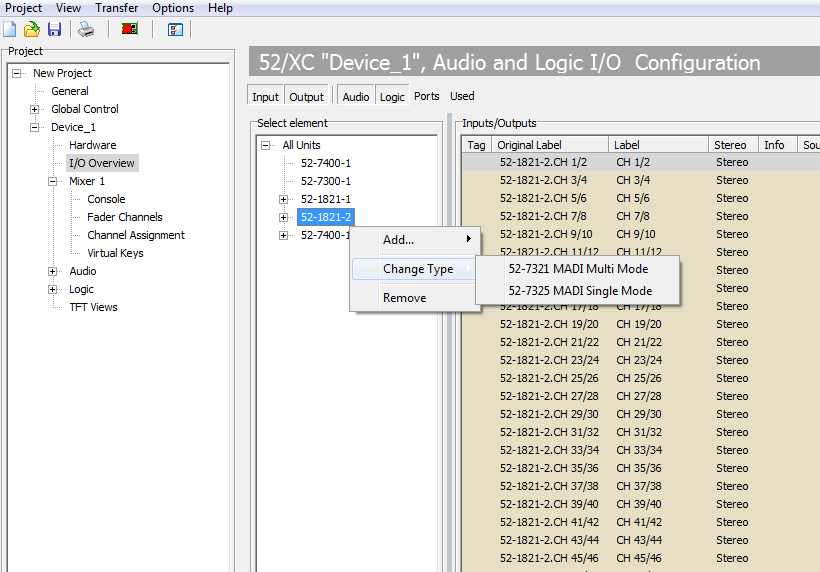
If you previously used a 52-1821 MADI Sub Module in your core or concentrator, you can use a 52-7321 or 52-7325 MADI SFP module as a replacement. Concentrators now support a MADI sub module on port SFP/GA 2.
To change the type of your 52-1821 MADI Sub Module, follow these steps:
- In Toolbox8 v8.2 go to
<device> / I/O Overview - In the
Select elementarea, right-click the 52-1821 MADI Sub Module - In the dropdown menu, go to
Change Typeand select your designated new MADI SFP module (see screenshot below) - Go to
<device> / hardwarepage and attach your new MADI SFP Module to the designated SFP Port in theUnit Portsarea.