Logic
The Logic node contains all attributes of the device logic system.
General Information
To configure the logic functions of the mixing device, in the project tree, select <Device>/Logic. The subsections of the Logic section are described here.
In this section of the Manual (and in the Toolbox 10 software) the following terms are used (which have the same meaning):
- logic 1, true, 1, active.
- logic 0, false, 0, not active.
- rising edge, signal change from 0 to 1.
- falling edge, signal change from 1 to 0.
All logic sources of a mixing device are shown in the Logic Sources window. When defining new logic functions, they also appear in this window in the Logic Functions section. You can use these functions exactly like the ones preset by the system.
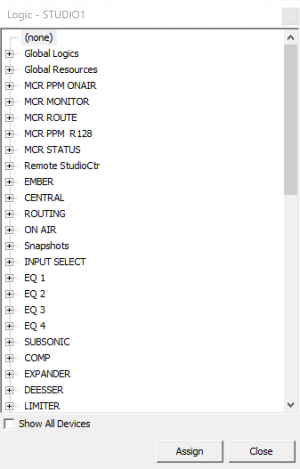
To open the Logic Sources window, in the View menu, click Logic Sources or press F5.
As input values for the functions described in this section, you can use all logic sources from the Logic Sources window.
The following table lists the separate function groups of logic sources and their sub entries as an overview. You also find detailed descriptions under the functions that control the corresponding logic sources.
Function Groups
(none)
| Entries | Description |
|---|---|
| - Logic 0 or inactive. |
Global Logics
| Entries | Description |
|---|---|
GL <serial number>: <name> | - Each global Logic can be used as logic source. |
Global Resources
| Entries | Description |
|---|---|
<Subscriber name> | - Each global resource with at least one defined subscriber can be used as logic source. |
Control-, Talkback- and Additional Modules
| Entries | Description |
|---|---|
Key <1…n>: <keylabel> | - Each key of the control, talkback and additional modules available in the configuration can be used as logic source; mostly, keys with the function User Defined are used. |
| - Each configured module is shown as separate section with its type and module ID. |
Virtual Keys
| Entries | Description |
|---|---|
Key <1…n>: <keylabel> | - Each virtual key defined in the configuration can be used as logic source. |
Defined buttons of the TFT Master Views
| Entries | Description |
|---|---|
<view>.key <1…n>: <keylabel> | - Each button of the TFT master views can be used as logic source. |
| - The configured buttons of the master views are shown as separate section with its type and module ID. |
Channel OFF
| Entries | Description |
|---|---|
- Active, if the corresponding channel is OFF. Can be used for Ready signalization. | |
- Is only shown if the Logic Sources window in the Fader Channels section is opened and a defined channel is selected. |
GPIs
| Entries | Description |
|---|---|
GPI <slot>.<plug>.01 | - GPIs (control inputs) of the modules configured under I/O Overview |
Logics Functions
| Entries | Description |
|---|---|
LF <serial number>: <Name> | - Active, if the logic function named <Name> is enabled. |
| - Each configured logic function has its own entry. |
System Functions
| Entries | Description |
|---|---|
| - Diverse singular functions. | |
| Pulse 1 | - Pulse generator, quick, approx. 450 ms. |
| - Pulse/pause relation approx. 1:1. | |
| - Only available as logic source for logic functions. | |
| - Application, for example for flashing functions. | |
| Pulse 2 | - Pulse generator, medium, approx. 900 ms. |
| - Pulse/Pause relation approx. 1:1. | |
| - Only available as logic source for logic functions. | |
| - Application, for example for flashing functions. | |
| Pulse 3 | - Pulse generator, slow, approx. 2 s. |
| - Pulse/Pause relation approx. 1:1. | |
| - Only available as logic source for logic functions. | |
| - Application, for example for flashing functions. | |
| Device Running | - Active if the corresponding device is in operation. |
| Sync 1 | - The logic is true if sync source 1 is active. |
| Sync 2 | - The logic is true if sync source 2 is active. |
| 48 kHz | - The logic is true if the device is synchronized to 48 kHz. |
| 44.1 kHz | - The logic is true if the device is synchronized to 44.1 kHz. |
| Power Fail | - The logic is active if one of the installed power supplies of a DSP frame or a router frame fails. |
| Wetness Alert | - Logic is true if in one of the control modules of your setup wetness is detected. For further information, check Maintenance Window. |
| Temperature Alert | - Logic is true if core becomes too hot |
| Core A Master | - On 52/XD Redundancy systems, logic becomes true if Core A is Master |
| Core B Master | - On 52/XD Redundancy systems, logic becomes true if Core B is Master |
| Slave Ready | - On 52/XD Redundancy systems, logic becomes true if defined slave is ready to become the master, therefore if redundancy is available. |
Mixer Functions
| Entries | Description |
|---|---|
| - Diverse singular functions. | |
| PFL1 On | - Active if at least one PFL1 key is pressed. |
| - Application, for example for toggling/mixing PFLs in loudspeakers or headphones via output functions. | |
| Off Air | - Active if at least one Off Air key is pressed. |
| - Application, for example for starting the Off Air Recording using a GPO. | |
| Voice | - Active if at least one fader channel is open with the Voice option configured. |
| - Application, for example as voice indication in the RDS data stream using a GPO. | |
| PGM 1 | - Active if at least one fader of a fader channel is open while routed to Program Bus 1 with PGM1 Logic configured. |
| - Application, for example starting a recorder using GPO. | |
| PFL2 On | - Active if at least one PFL2 key is pressed. |
| - Application, for example for toggling/mixing PFLs in loudspeakers or headphones via output functions. | |
| Timer Running | - Active if at least one fader of a fader channel with Timer Reset configured is open. |
| - Application, for example for controlling external timers via GPO. | |
| Timer Reset | - Pulse if at least one fader of a fader channel with configured Timer Reset is open. |
| - Application, for example for controlling external timers via GPO. | |
| Solo In Place | - Active if at least one Solo In Place key is pressed. |
| Access On | - Active if at least one channel has access on. |
| User Logged In | - Active if a User is logged in. |
| Combined Logic 1…4 | - Active, if the selected combined logic is Active. |
| Load Ch Snapshot | - Active, when channel Snapshot is loaded. |
| Save Ch Snapshot | - Active, when channel Snapshot is saved. |
| Load Mixer Snapshot | - Active, when mixer Snapshot is loaded. |
| Save Mixer Snapshot | - Active, when mixer Snapshot is saved. |
Logic Delay
| Entries | Description |
|---|---|
LD <serial number>: <Name> | - Active if a logic function is selected and the delay time has not run out. |
- Every configured Logic Delay has an entry. (See also Logic Delays) |
Level Detects
| Entries | Description |
|---|---|
LV <serial number>: <Name> | - Active if the level exceeds the set threshold. |
- Every configured Level Detect has its own entry. (See also Level Detection) |
Correlation Detects
| Entries | Description |
|---|---|
LC <serial number>: <Name> | - Active if the correlation level (-1 to +1) is exceeded. |
- Every configured Correlation Detect has its own entry. The detector is configured in the Logic/Level Detects dialog. (See also Level Detection) |
Clock Logics
| Entries | Description |
|---|---|
CL <1…n> | - Active if the selected Clock Logic is active. |
Generic for TFT
| Entries | Description |
|---|---|
| - These logics are related to the physical faders or the assigned fader channels below the respective TFT fader views. | |
| Fader Start Channel | - Active if the fader of the corresponding fader channel below the TFT fader view is open and On. |
- Exception: If the On Start option is enabled for the currently assigned fader channel, the fader start can be triggered with the On/Off key in the fader strip only. (See also Fader Start) | |
| Fader Start Fader | - Active if the corresponding physical fader below the TFT fader view is open and On. |
- Exception: If the On Start option is enabled for the currently assigned fader channel, the fader start can be triggered with the On/Off key in the fader strip only. (See also Fader Start) | |
| PFL Channel | - Active if PFL of the corresponding fader channel below the TFT fader view is active. |
| PFL Fader | - Active if PFL of the corresponding physical fader below the TFT fader view is enabled. |
| Fader Function 1 Channel | - Active if the key function Fader Function of the corresponding fader channel below the TFT fader view is active. (See function Fader Function) |
| Note: The condition of the fader function is kept in the background even if the fader channel is not routed to the fader strip any longer! | |
| Fader Function 2 Channel | - Active if the key function Fader Function 2 of the corresponding fader channel below the TFT fader view is active. (See function Fader Function) |
| Note: The condition of the fader function is kept in the background even if the fader channel is not routed to the fader strip any longer! | |
| Fader Function Fader | - Active if the key function Fader Function of the corresponding physical fader below the TFT fader view is active. (See function Fader Function) |
Clean Feeds
| Entries | Description |
|---|---|
- Logic sources that become active when enabling the clean feed by pressing a key. Clean feeds are configured under <Device>/<Mixer>/Fader Channels in the project tree. (See Fader Channels – Configuring Signal Sources) | |
| - Every configured clean feed has the following entries labelled with the input name of the fader channel: | |
CF <serial number> Prep. <inputname> | - Preperation Mode in this fader channel enabled and fader closed. |
CF <serial number> Talk <inputname> | - Talk key function in this fader channel enabled. |
CF <serial number> Off Air <inputname> | - Off Air key function in this fader channel enabled. |
CF <serial number> Outp. Sel. <inputname> | - Output Select function enabled in this fader channel. (Alternative return signal instead of clean feed.) |
Fader Starts (Fader)
| Entries | Description |
|---|---|
Mixer.FS Fader <serial number> A: <inputname> | - Active if the physical fader with the corresponding number 1…n is open and On. |
- Exception: If the On Start option is enabled for the currently assigned fader channel, the fader start can be triggered with the On/Off key in the fader strip only. (See also Fader Start) | |
- Each configured fader 1…n has its entry independent from the currently assigned channel. |
Fader Starts (Channel)
| Entries | Description |
|---|---|
Mixer.FS Ch <serial number>: <inputname> | - Active if the fader of the fader channel <Faderchname> is open and On. |
- Exception: If the On Start option is enabled for the currently assigned fader channel, the fader start can be triggered with the On/Off key in the fader strip only. (See also Fader Start) | |
| - Each configured fader channel has its own entry. |
PFL (Fader)
| Entries | Description |
|---|---|
Mixer.PFL Fader <serial number> A: <inputname> | - Active if PFL of the physical fader with the corresponding number 1…n is enabled. |
- Each configured fader 1…n has its entry independent from the currently assigned channel. |
PFL (Channel)
| Entries | Description |
|---|---|
Mixer.PFL Ch <serial number>: <inputname> | - Active if PFL of the fader channel <Faderchname> is active. |
| - Each configured fader channel has its entry. |
Fader Function (Fader)
| Entries | Description |
|---|---|
Mixer.FF Fader <serial number> A: <inputname> | Active if the key function Fader Function of the physical fader with the corresponding number 1…n is active. (See function Fader Function) |
- Each configured fader 1…n has its entry independent from the currently assigned channel. |
Fader Function 1(Channel)
| Entries | Description |
|---|---|
Mixer.FF1 Ch <serial number>: <inputname> | - Active if the key function Fader Function of the fader channel <Faderchname> is active. (See function Fader Function) |
| - Each configured fader channel has its entry. | |
| Note: The condition of the fader function is kept in the background even if the fader channel is not routed to the fader strip any longer! |
Fader Function 2(Channel)
| Entries | Description |
|---|---|
- Active if the key function Fader Function 2 of the fader channel <Faderchname> is active. (See function Fader Function) | |
| - Each configured fader channel has its entry. | |
| Note: The condition of the fader function is kept in the background even if the fader channel is not routed to the fader strip any longer! |
Selector Logics
| Entries | Description |
|---|---|
SL <1…n> | - Active if the Selector Logic is true, so if the Selector defined in the Selector Logic has the defined Source active. |
Status Logics
| Entries | Description |
|---|---|
<Device>.<Port> State | - Active, if the port is not connected or not working. Can be APC, GA, MADI, SFP or Power ports. |
Talkback Sources
| Entries | Description |
|---|---|
TB Src <Name> | - Active if the corresponding talkback source is used. (See also Talkback System) |
Talkback Destinations
| Entries | Description |
|---|---|
TB Dest <Name> | - Active if the corresponding talkback destination is used. (See also Talkback System) |