Project Setup
Configuring a DHD system is a complex process. There are always different ways to do it. The sequence of the individual steps is often not static. Despite this, the following list is to be understood as a proposal, how to configure for example a brand new RX2. This list is neither complete nor very detailed, but it gives a basic overview of the configuration process:
-
Set up the general options for the project. (see Device Properties) Insert a device: Right-click on the project tree and click
Add 52/XC3,Add 52/XD3,Add RX2 base config,Add 52/TX2 base configorAdd SX2 Wizard Config. (see Project)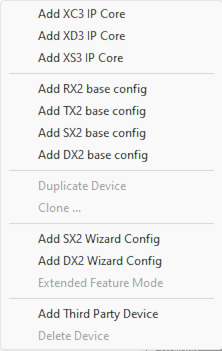
-
Select the hardware I/O modules for your setup and assign the correct APC ports. (see I/O Overview)
-
Create your console layout: Select the fader and control modules for your configuration and assign the correct APC ports. (see Console)
-
Set up the audio system with PGM busses, AUX busses, n-1/clean feed busses, fader channels etc. (see Mixing Functions)
-
Set up the logic system to include key functions, GPIOs etc. (see General Information on Logic)
-
Connect the audio signals and logic functions with output functions. (see Output Functions)
-
Route the audio signals from the internal bus to the outputs of the hardware modules. (see I/O Overview)