Potentiometers - Assigning Potentiometers
On the Potentiometer tab, you can configure values for physical and software potentiometers. To modify the level values in Output Functions, you can use potentiometer functions in every mixing device. The potentiometers are used to adjust monitoring and headphone levels, for talkback functions, to adjust Aux sends and so on.
A potentiometer can be linked with an audio signal in an output function to adjust its level.
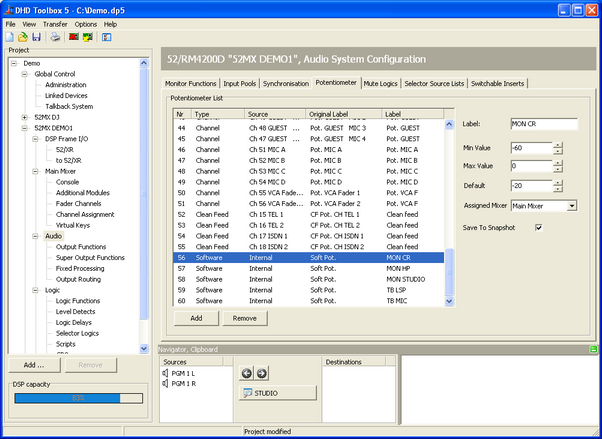
In the potentiometer list, all available physical potentiometers and all created software potentiometers are shown. Click Add to add a software potentiometer. To delete a software potentiometer from the list, select the software potentiometer and click Remove. It is not possible to add or remove physical potentiometers. They are added or removed depending on the modules used in the console layout.
The columns of the potentiometer list are described in the following table:
| Column | Description |
|---|---|
| Nr | In the Nr column, you see the serial number of the potentiometer. |
| Type | In the Type column, the type of the potentiometer is shown: Channel, ACI, Balance, Clean Feed or Software. |
| Source | In the Source column, the source is shown that is affected by the potentiometer. For a software potentiometer, the source is always intern. |
| Original Label | The Original Label is created automatically from the names of the type and/or the source of the potentiometer. This label cannot be changed because for internal processing, it has to be unambiguous. |
| Label | The Label is created like the Original Label, but it is restricted to 10 characters and may be changed. |
You can change options for the selected potentiometer. The shown options depend on the type of potentiometer. All possible options are described in the following table:
| Column | Description |
|---|---|
| Label | Enter a name for the selected potentiometer to change the Label (in the Potentiometer List) which was created automatically. |
| Min Value | Enter a minimum value for the potentiometer. The potentiometer value can't be below this value during operation. |
| Max Value | Enter a maximum value for the potentiometer. The potentiometer value can't be higher than this value during operation. |
| Default | After switching on or reset the device, the potentiometer is set to the value entered here. |
| Assigned Mixer | The potentiometer can be assigned to a virtual mixer. (See also Virtual Mixers) After inserting a new software potentiometer, this value is set to (none) (no assignment). |
| Save to Snapshot | Activate this option if the settings of the potentiometer should be saved in mixer snapshots. Please note the Software Potentiometer option (Mixer Snapshot Options). |