MicroSD Card
A micro SD card is included in the following devices:
- 52/XC Cores (52-740xC or later),
- 52/XC2 Cores,
- 52/XD Cores,
- 52/XD2 Cores,
- 52/XS Cores (52-180xC or later)
- 52/XS2 Cores
This card acts as a dongle and the licenses stored on the microSD card are bound to the internally stored serial number (Sxxxxxxxxx) of this microSD card. The SNxxxxx number printed on the hologram label (hologram reference number) is only required in case of a microSD card failure to restore the licenses.
It could happen that the microSD serial number appears as a negative value with format S-xxxxxxxxx in the Maintenance window. This is caused by an error on the Maintenance webpage - the microSD card itself is not affected! This issue “Maintenance Page: MicroSD Card Serial Number could appear as negative value” is fixed since the following firmware versions:
- 8.1.44
- 8.2.8
A firmware update is recommended in this case.
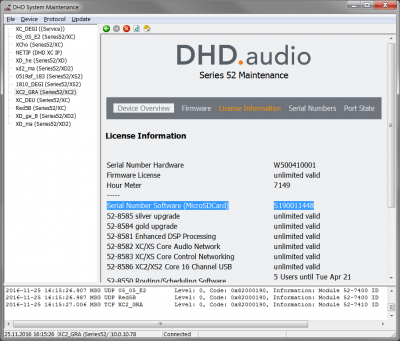
All available software licenses and feature upgrade licenses are stored on the microSD card. This includes the following licenses:
52-8511 - PC TFT View Software 52-8550 - Routing/Scheduling Software 52-8551 - Routing Software 52-8552 - Routing Software, single matrix 52-8553 - Additional license for 52-8550 52-8554 - Additional license for 52-8551 52-8555 - Monitoring Software 52-8562 - Snapshot Manager Software 52-8563 - Remote Control Software 52-8564 - Remote Control Software, float. 52-8565 - DSP Control Software 52-8566 - DSP Control Software, float. 52-8571 - Pro-Bel Protocol SW-P-02 52-8572 - ESAM-II control protocol 52-8575 - MIDI Protocol Converter Software 52-8581 - Enhanced DSP Processing 52-8582 - XC/XS Core Audio Network 52-8583 - XC/XS Core Control Networking 52-8584 - XC2 Core Gold upgrade 52-8585 - XC2 Core Silver upgrade 52-8591 - SNMP Support for DHDOS
The microSD card also includes the firmware, the configuration and snapshots of this core device.
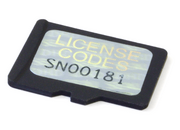
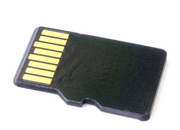
In case of a replacement of the core device, it is only required to put the microSD card from the installed device to the replacement device (which has to be the same device type as the device that will be replaced). When the replaced core device will be switched on, it will boot with the last configuration state as the first device.
Only the microSD cards delivered by DHD can be used.
It is possible to copy the content of the microSD card, but the licenses will not work on this copy because they depend on the internal unique serial number of the microSD card.
In case of a microSD card failure, the microSD card needs to be returned to DHD! Do NOT throw away the microSD card! Do NOT remove the hologram label with the hologram reference number (SNxxxxx)! In the event of loss of the microSD card, the licenses will not be replaced.
Position at Core devices
In the following pictures you can see the position of the microSD card slot at each core.
| Device | Location of the microSD Card and microSD card orientation | Picture |
|---|---|---|
| 52/XC2 Core 52-7420, 52-7410 | At the left side of the core. -> Insert the micro SD card with pins on the top side | 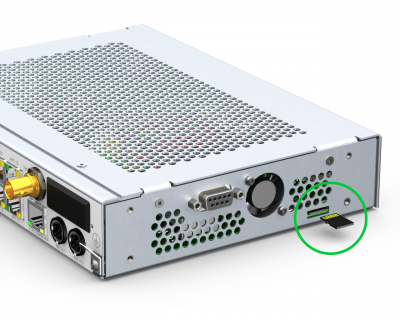 |
| 52/XC Core 52-740xC or later | At the front panel of the core, behind the 19“-Adapterpanel. -> Insert the micro SD card with pins on the bottom side | 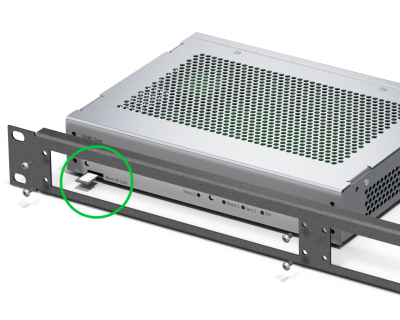 |
| 52/XS2 IO Core 52-1830 | At the left side of the core, behind the rack mount bracket. -> Insert the micro SD card with pins on the top side | 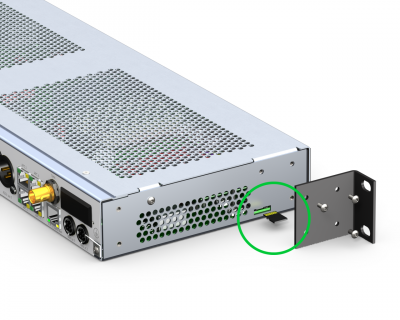 |
| 52/XS2 Core 52-1810 | At the left side of the core. -> Insert the micro SD card with pins on the top side | |
| 52/XS Core 52-180xC or later | At the front panel of the core, behind the 19”-Adapterpanel. -> Insert the micro SD card with pins on the bottom side | |
| 52/XD2 Core with 52-7456 XD2 Controller | At the rear panel of the core. -> Insert the micro SD card with pins on the top side | 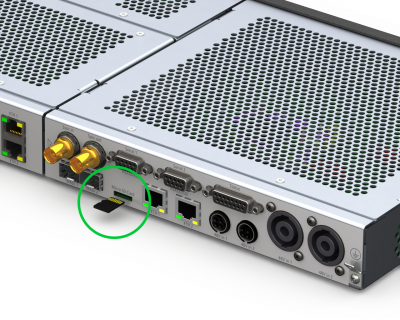 |
| 52/XD Core with 52-7450 XD Controller | At the rear panel of the core. -> Insert the micro SD card with pins on the top side | 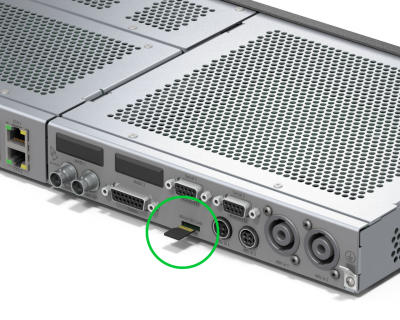 |
The microSD card needs to be plugged into the Core device for operation. The pin orientation is different between the different core types: • 52/XC Core and 52/XS Core: insert the microSD card with pins on the bottom side • 52/XC2 Core, 52/XS2 Core, 52/XD2 core and 52/XD Core: insert the microSD card with pins on the top side