Selector Source Lists
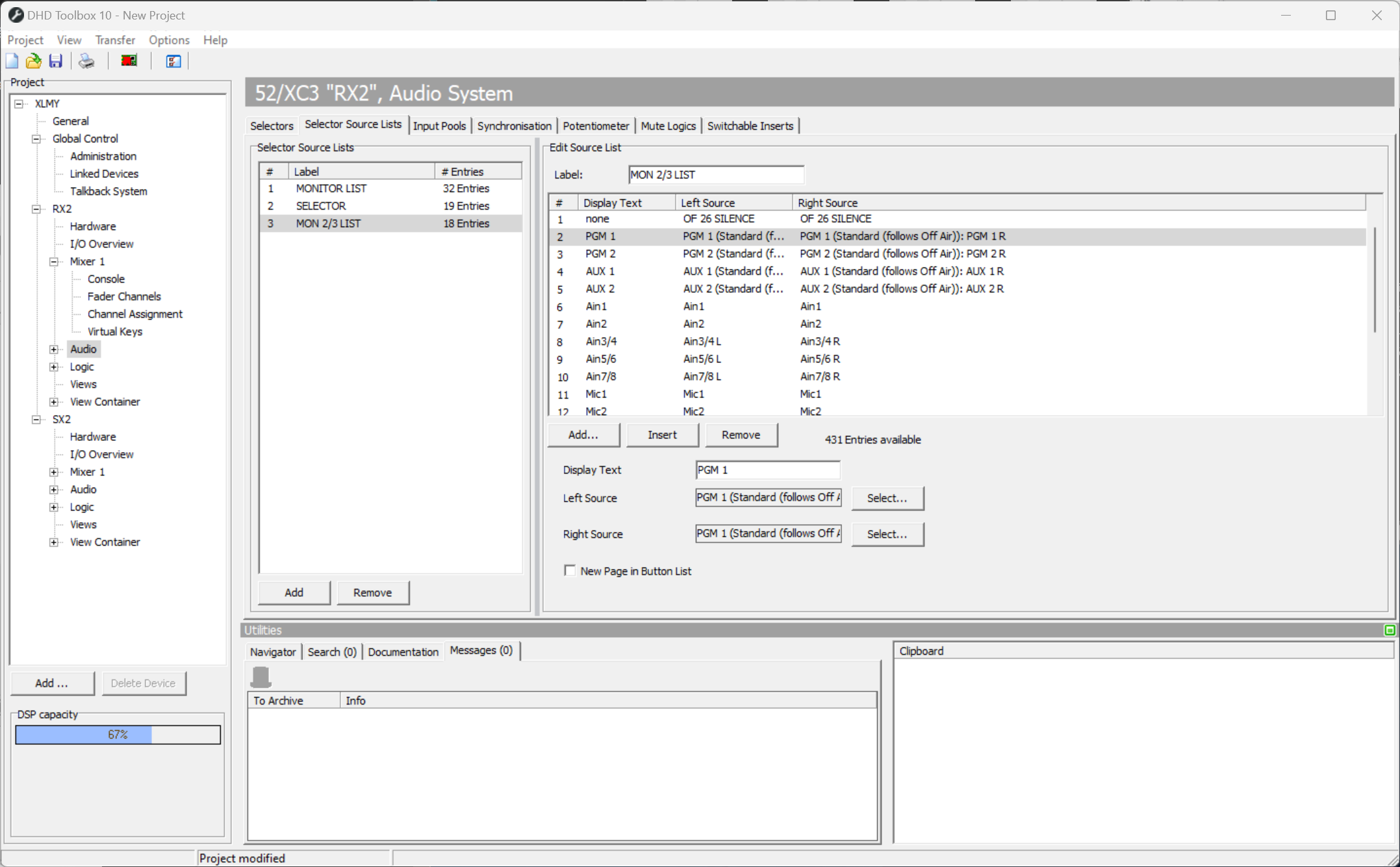
On this tab, you can configure signal lists (Selector Source Lists) that are required for configuring selector functions.
Up to 20 different signal lists with a total of 500 entries are available. For example up to 20 lists with 25 entries each or a list of 500 entries can be configured.
To configure a signal list, follow these steps:
- In the
Selector Source Listsarea, select a source list from the list. - If necessary, assign a distinctive name to it by entering the name in the
Labelbox. - In the
Edit Source Listarea, click Add to add an audio sources entry to the list. Each row represents a stereo signal.Insertadds an audio sources entry on the current selected position. Alternatively, you can drag & drop entries to sort them. - In the
Display Textbox, enter a name for the list entry. - To assign an audio source for the left channel to the list entry, click
Selectbesides theSource Leftbox. TheAudio Sourceswindow opens. Every signal available on the TDM bus can be used as source. - In the
Audio sourceswindow, select an audio source and clickAssign. Alternatively, you can double-click on the audio source or drag it from theAudio Sourceswindow to theSource leftbox. - To assign an audio source for the right channel to the list entry, click
Selectbesides theSource Rightbox. TheAudio Sourceswindow opens. Every signal available on the TDM bus can be used as source. - In the
Audio sourceswindow, select an audio source and clickAssign. Alternatively, you can double-click on the audio source or drag it from theAudio Sourceswindow to theSource rightbox.
To delete a source, select the desired source in the list and click Remove.
The last selector positions are kept after rebooting the device.
After a firmware reset, they are set to the list entry saved in Default Snapshot. If nothing is defined the entry is reset to the default source of the selector.