Timers
Select the Timers tab to set the options for the available timers in the system.
You can use timers to show or set periods of times in which faders are open, to control other functions. (see Timer Running and Timer Reset for information)
In the Timers area, all available timers are listed. You can neither add nor remove existing timers. Also, you cannot change the sequence of the timers in the list. You can use a maximum of six timers per mixer.
The timers in the list have a fixed serial number Nr and a Label. You cannot change the numbers. Select a timer from the Timers list. In the Edit Timer area, enter a name for this timer in the Label box. This name may be up to 16 digits long. You can see the name Timers list in the User Label column.
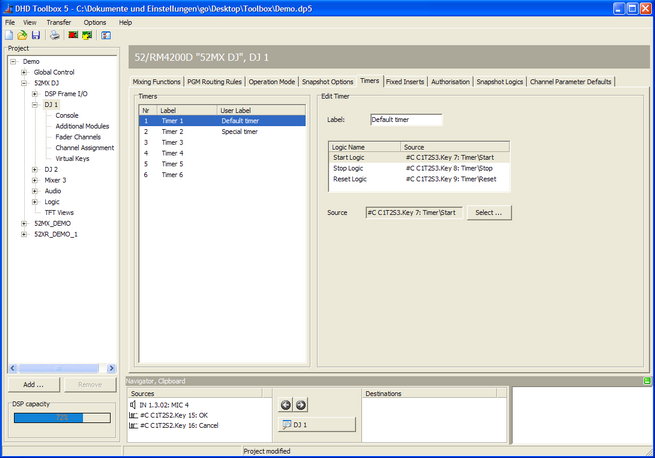
For each timer, you can select a logic source for Start, Stop, and Reset. For this, you can use any logic source, for example the keys of a control module.
Select a timer from the Timers list. In the Edit Timer area, select a logic from the list. Click Select next to the Source box. The Logic Sources window opens. Select a logic source and click Assign. Alternatively, you can also double-click on the Logic source or use drag & drop.